
Universal Cloud Saver Chrome extension overview

ProjectsCase StudyBrowser Extension2026

Case Study

Universal Cloud Saver

A Manifest V3 Chrome extension that saves images, videos, and files from any website straight to Google Drive—no Downloads folder.

A Manifest V3 Chrome extension that saves web images, videos, and files straight to Google Drive—no Downloads folder round-trip.

Universal Cloud Saver is a privacy-first browser extension: right-click (or paste/drag) media from any site and upload it to Drive with a durable queue, type-based folders, and least-privilege OAuth—built entirely in the browser with no app backend.

Industry
Productivity · Browser tooling
Category
Chrome Extension · Cloud upload
Role
Full Stack Product Engineer — extension architecture, Drive provider, queue, and UI end to end
Timeline
2025 — 2026
Status
v1.0 product build
Stack
React · TypeScript · Vite · CRXJS · Zustand · Zod · Tailwind · Google Drive API · Vitest · Playwright

Executive Overview

Universal Cloud Saver removes the annoying download → open Drive → upload loop. Researchers, designers, and students right-click an image, video, PDF, or link and land the file in a organized Drive folder in one step.

There is no product backend. Auth uses chrome.identity with drive.file scope; files go browser → Google Drive. That is both a privacy story and a Chrome Web Store–friendly architecture.

Under the hood sits a Clean Architecture upload core: a StorageProvider interface with Google Drive as Phase 1, a persistent queue that survives MV3 service-worker restarts, and multi-tier fetch that works around CORS and iframe-hosted media.

The UX spans context menus, a popup dashboard (account, quick save, live queue, recent), and an options page for folders, duplicates, concurrency, compression, and theme.

Business Problem

Existing workflow

Save from the web into Downloads, then manually upload to Drive—or open Drive in another tab and drag files across. Large videos and CORS-blocked media make that even slower.

Pain points

  • Constant Downloads clutter for people who really want files in Drive.
  • Manual upload breaks flow when researching or collecting references.
  • Large files fail or stall without resumable upload handling.
  • Authenticated or iframe-hosted media often cannot be fetched with a naive background request.
  • MV3 service workers sleep mid-upload unless the queue is durable and wakeable.

Why it matters

Saving to cloud is a daily micro-task. If it is not one gesture—and reliable for big files—users abandon the tool. Privacy-conscious users also reject extensions that proxy files through a third-party server.

Solution

Universal Cloud Saver keeps the entire pipeline in Chrome and Google’s APIs:

  • Right-click save

    Context menus for images, video/audio, links, PDF pages, and selected URLs—straight into Drive.

  • Popup quick save

    Paste a URL, use the clipboard, or drag-drop; watch the live queue and recent uploads.

  • Smart Drive uploads

    Multipart for smaller files; resumable 8MB chunks for ≥100MB with Content-Range and retryable partial sessions.

  • Durable queue

    Pause, resume, cancel, retry; offline resume on reconnect; configurable concurrency (1–5).

  • Organized folders

    Root folder plus type folders (Images, Videos, PDFs, …) and optional date folders, with rename/duplicate strategies.

One-gesture save to Drive, organized without Downloads clutter, with least-privilege OAuth and an architecture ready for more clouds later.

Core Features

Capture surfaces

Context menus

Save image, video/audio, link, PDF page, or selected URL from any page.

NeedSaving should happen where the user already is—on the page.

ValueZero context switch to Downloads or Drive UI.

Popup dashboard

Account status, quick save, live queue, recent uploads, open Drive folder.

NeedUsers need progress visibility and a fallback when context menus are not enough.

ValueTrust that large or multiple uploads are still running.

Options

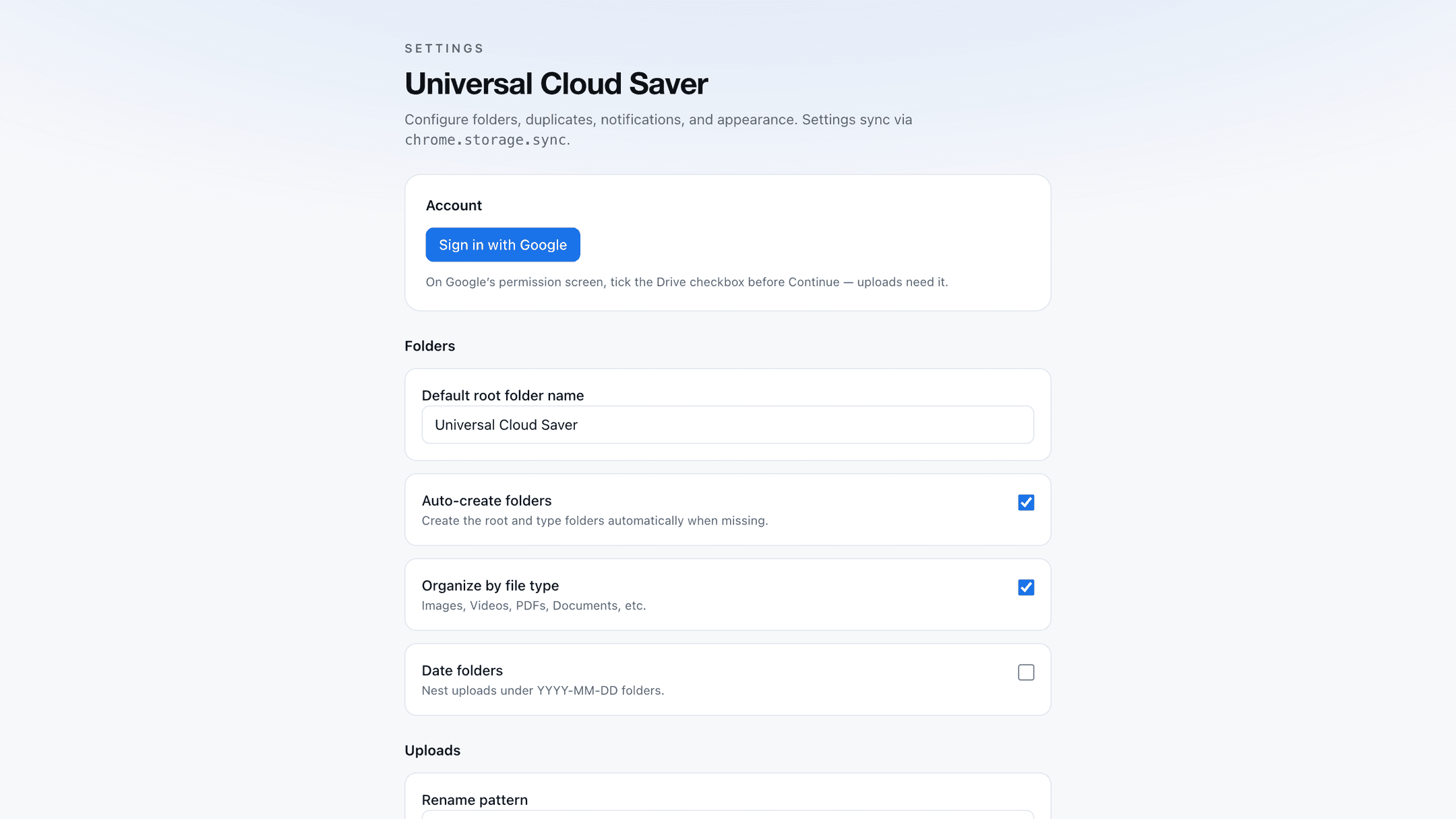
Sign-in, root folder, organize-by-type, date folders, rename patterns, duplicates, concurrency, compression, notifications, theme.

NeedPower users want control without leaving the extension.

ValueFits research, design, and student workflows.

Upload engine

Size-aware upload

Multipart under 100MB; resumable chunked upload for large files.

NeedVideos and PDFs regularly exceed fragile single-shot uploads.

ValueLarge saves complete instead of failing silently.

Persistent queue

chrome.storage.local persistence with pause/resume/cancel/retry and offline reconnect.

NeedMV3 workers can die mid-job.

ValueUploads survive restarts and flaky networks.

Duplicate strategy

Rename, keep both, overwrite, or skip when a file already exists.

NeedRepeated saves of the same asset are common.

ValuePredictable Drive folders without manual cleanup.

Auth & privacy

chrome.identity OAuth

Google sign-in with drive.file, userinfo.email, and userinfo.profile scopes.

NeedUsers should not paste tokens or trust a random backend.

ValueFamiliar Google consent with least privilege.

Zero backend

Files go browser → Drive; no product server stores or proxies content.

NeedPrivacy and simpler ops for a Chrome extension.

ValueStronger store review and user trust story.

Provider abstraction

StorageProvider interface + registry; Drive first, Dropbox/OneDrive flagged future.

NeedUpload/UI logic should not hard-couple to one cloud.

ValueRoom to expand without rewriting the queue.

Reliability tooling

Multi-tier fetch

Background fetch → content-script credentials → scripting.executeScript into owning frame (incl. iframes).

NeedMany media URLs are CORS-blocked or session-bound.

ValueMore saves succeed on real websites.

Zod settings

User settings and external inputs validated with schemas; typed AppError codes.

NeedCorrupt storage or bad input should fail clearly.

ValueSafer options UX and easier debugging.

Vitest + Playwright

Unit tests for Drive helpers; e2e against unpacked extension with SW seed hooks.

NeedExtensions regress easily across Chrome versions.

ValueConfidence before packing for the Web Store.

User Journey

Right-click → Drive

  1. 01

    User finds an image or video on any site

  2. 02

    Right-clicks → Save to Google Drive

  3. 03

    Extension fetches the resource (with fallbacks if needed)

  4. 04

    File is prepared, folder resolved, and queued

  5. 05

    Upload completes; notification + recent history update

Popup quick save

  1. 01

    Opens the toolbar popup

  2. 02

    Pastes a URL or drops a file / uses clipboard

  3. 03

    Watches queue progress

  4. 04

    Opens the Drive folder when done

First-time setup

  1. 01

    Installs the extension

  2. 02

    Opens Options → Sign in with Google

  3. 03

    Grants drive.file consent

  4. 04

    Sets root folder and organization preferences

  5. 05

    Starts saving from the web

Technical Highlights

Clean Architecture + providers

UI and queue talk to a StorageProvider interface; Google Drive is the first implementation, with room for more clouds.

Business valueProduct can expand storage targets without rewriting capture UX.

MV3-aware durable queue

Jobs persist in chrome.storage.local; mid-upload work resets safely on worker init; alarms wake token refresh and the queue.

Business valueUploads do not silently die when Chrome suspends the service worker.

Resumable large uploads

Drive resumable sessions with chunked Content-Range, 308 offset queries, and retryable PARTIAL_UPLOAD handling.

Business valueVideos and big PDFs finish instead of restarting from zero.

CORS / iframe fetch resilience

Three-tier fetch path reaches media that background fetch alone cannot read.

Business valueHigher success rate on modern, media-heavy sites.

Least-privilege OAuth

drive.file limits access to files the extension creates—not the user’s entire Drive.

Business valueClearer consent UX and stronger privacy positioning.

Stable extension ID

Public key pinned in the manifest config so the OAuth item ID stays stable across rebuilds.

Business valueLocal and store builds do not break Google Cloud OAuth wiring.

Challenges & Solutions

ChallengeSolution
Users wanted Drive organization without trusting a third-party upload proxy.Browser-only architecture: chrome.identity + Drive API, no product backend.
MV3 service workers can sleep mid-upload and drop in-memory state.Persistent queue, alarms, and safe re-queue of interrupted jobs on worker init.
Many page media URLs fail under simple extension fetch because of CORS or iframes.Fallback chain through content script and executeScript into the owning frame.
Large videos need more than a single multipart POST.Size thresholds with resumable chunked uploads and recoverable partial sessions.
Future multi-cloud support would be expensive if Drive were hard-coded everywhere.Early StorageProvider abstraction and feature flags for Dropbox / OneDrive.

Tech Stack

Extension
Chrome Manifest V3 — service worker, contextMenus, identity, storage, alarms, scripting
Frontend
React 19, TypeScript, Tailwind CSS 4, Lucide, Zustand
Build
Vite 8, @crxjs/vite-plugin (HMR for popup/options)
Validation
Zod schemas for settings and domain inputs
Cloud
Google Drive API v3 — multipart + resumable uploads
Auth
chrome.identity.getAuthToken — drive.file + userinfo scopes
Storage
chrome.storage.local (auth, queue, recent); chrome.storage.sync (settings)
Testing
Vitest unit tests; Playwright e2e on unpacked extension

Project Gallery

Recommended capture order for the case-study gallery.

  1. 01Chrome Web Store / marketing hero
  2. 02Right-click context menu — Save to Drive
  3. 03Popup — signed in with live queue
  4. 04Popup — quick save URL / drag-drop
  5. 05Popup — recent uploads
  6. 06Options — Google sign-in
  7. 07Options — folder organization
  8. 08Options — duplicates & concurrency
  9. 09Drive folder tree — Images / Videos / PDFs
  10. 10Large file resumable upload progress
  11. 11Desktop notification — upload complete

Key Learnings

Product

For save tools, reliability beats feature count—queue durability and fetch fallbacks matter more than another settings toggle.

Engineering

MV3 forces you to design for process death: persist early, wake with alarms, and treat in-memory state as ephemeral.

Architecture

A provider interface pays off even at v1 when the upload core is the product’s heart.

Privacy

drive.file plus no backend is a clearer story for users and store review than broad Drive scopes with a proxy server.

Future Improvements

PriorityImprovementBusiness value
HighBulk page scan and richer drag-and-drop captureFaster collection when a page has many assets.
HighDropbox and OneDrive providers behind the same StorageProviderMeet users on the cloud they already use.
MediumAI-assisted folder suggestions and hash-based duplicate detectionCleaner libraries without manual renaming.
MediumShared Drives / Team Drive supportBetter fit for work research workflows.
LowChrome Web Store listing polish and onboarding tourHigher install-to-first-save conversion.

Building a Chrome extension or cloud workflow tool?

Universal Cloud Saver is a case study in Manifest V3 reliability—OAuth, resumable uploads, durable queues, and Clean Architecture without a backend. If you need similar craft on a browser product, start a conversation.

Start a conversation
Optional technical notes

Notes on how the extension stays reliable without a server and how Drive stays swappable.

Why no backend

Every byte the user saves goes from the page context to Google Drive under their own OAuth token. That removes a privacy and cost surface that many “save to cloud” tools introduce with a proxy API.

The tradeoff is that all hard problems—CORS, queue durability, resumable sessions—must be solved inside the extension.

Upload pipeline

Source → fetch (with fallbacks) → prepare (name, optional compress, duplicates) → resolve folders → upload by size → queue orchestration → notify + recent history.

Business state lives in the service worker; UI state in Zustand; settings in sync storage; queue/auth/recent in local storage.

Provider boundary

Queue and UI depend on StorageProvider, not Drive SDK calls. Google Drive is Phase 1; Dropbox and OneDrive are documented as future implementations behind the same registry.

Role

Full Stack Product Engineer

Client

Personal product / Chrome extension

Date

2026

Collaborators

Solo build

Next Project

ZN CMS

View next
Ask AI about Zohaib